

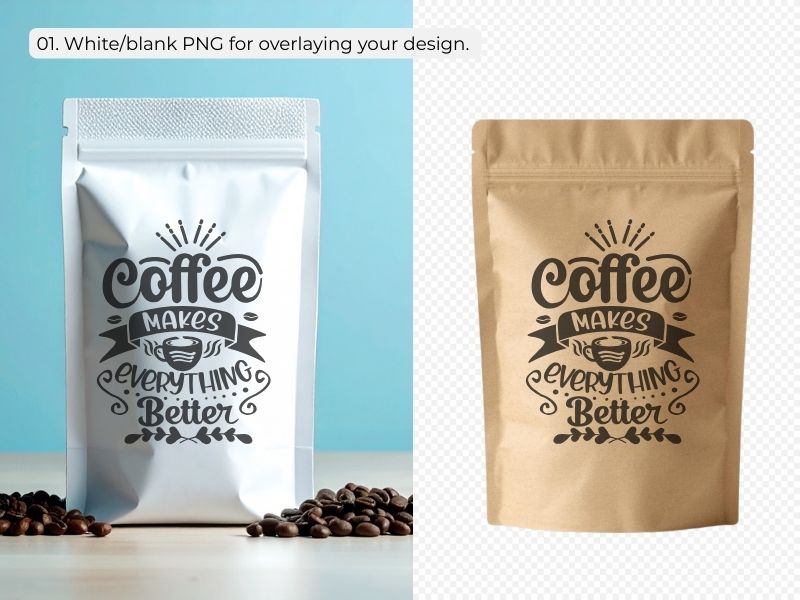
1. Basic White or Blank PNG Mockup
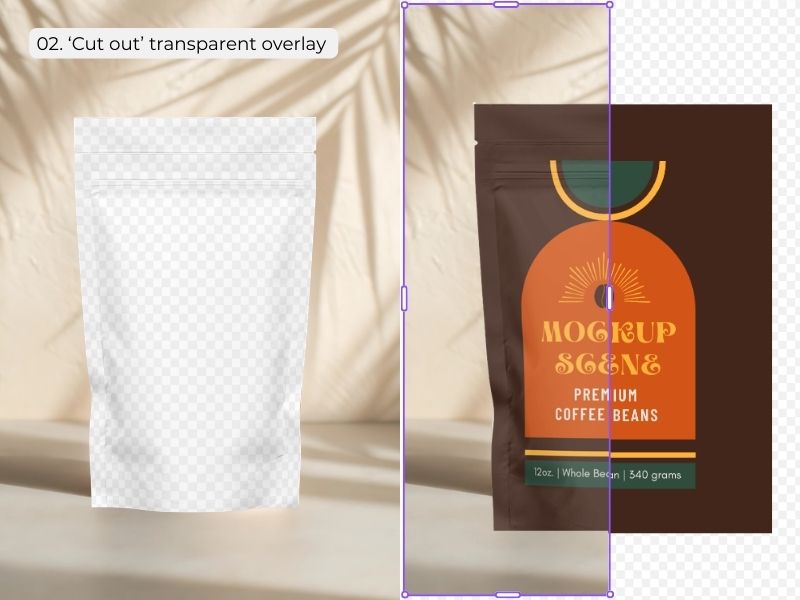
2. ‘Cut Out’ Transparent PNG Overlay

3. Canva’s Built-in App – with background
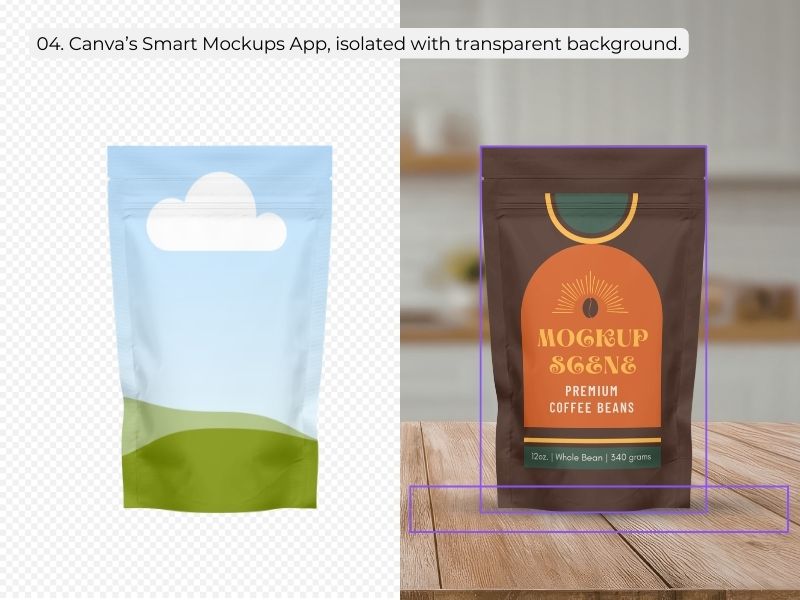
4. Canva’s Built-in App – with Transparent Background
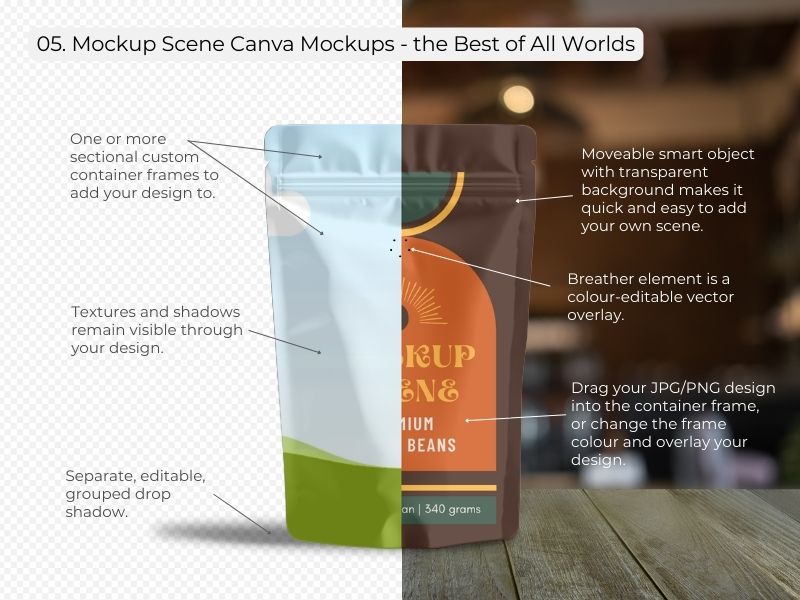
5. Mockup Scene Canva Smart Mockup
Not all Canva Mockups are Created Equal: Finding the Perfect Fit for Your Shop
If you’ve spent any time searching for ways to display your digital designs, you’ve likely realized that the world of Canva mockups is surprisingly varied. Some are easy to use but look fake, while others are realistic but impossible to customize. Let’s take a look at why not all Canva mockups are created equal.
To help you choose the right tool for your brand, let’s break down the different types of mockups available today and see how they stack up.
I’ve used a simple coffee pouch mockup to demonstrate the differences as simply as possible.
The Spectrum of Canva Mockups
When you’re shopping for mockups, you’ll generally run into four common types before finding a professional-grade solution.
1. Basic white or blank PNG/JPG
These are static, flat images of a product.
Sometimes these are transparent PNG files, and sometimes they are attached to a specific background.
You have to manually resize and rotate your design to ‘sit’ on top of the image. Your image often looks like it’s been placed onto the mockup digitally and not like it’s been printed onto the object.
While these are realistic and high quality, they lack any drag-and-drop functionality, making them time-consuming for busy sellers. This also means that they don’t support all-over designs.
2. Transparent PNG Overlays
These are essentially ‘cutouts’ that you place over your design so your design shows through the negative space that forms the mockup.
While these offer some texture integrity, they are not moveable or color-editable. You are stuck with the same mockup that thousands of other designers are using.
3. Canva’s Built-in App – (Smartmockups) with attached backgrounds
Canva offers an integrated app that allows for easy drag-and-drop.
There are two mockup types within this feature.
The first type of mockups in Canva’s app have ‘attached’ backgrounds. You add the mockup to your design page and drag and drop your design into the frame. This takes a few seconds to process and is not instant. Some of these mockups allow you to change the colour of the mockup surface. But you can’t change the background. You get what you get and are stuck using the same mockup as thousands of other users.
4. Canva’s Built-in App – Isolated Mockups with Transparent Backgrounds
This is the second type of mockup in Canva’s integrated Smartmockups app.
These mockups are Isolated objects with a transparent background so you can place them onto your background of choice. They all have just a single container frame to add your design to. You can’t edit mockup surface colours, sections, or drop shadows. But you can add a shadow element behind the object. You won’t be able to group the shadow and the object so repositioning is tedious.
Both of the Canva mockups with attached backgrounds and those with transparent backgrounds allow for a ‘quick fix’ but they don’t support unique customised mockup designs that are different from what everyone else is using.
What Makes a Mockup Scene Smart Mockup Different?
I realized that digital sellers shouldn’t have to choose between realism and flexibility. My mockups are designed to be a combination of every high-end feature through the range of Canva mockups available.
The Best of All Worlds Features
Not only are my Canva Smart Mockups built from original photographs or hand-drawn vectors, they display all the features of the mockups in Canva’s app plus some extras. They that tick every single box for professional quality and ease of use.
- True Realism: Unlike generic AI renders, these are built from actual photographs of physical objects or custom builtvector drawings.
- Total Texture Integrity: The surface texture of my mockups (like fabric grain or paper tooth) shows through your design automatically with the option to reduce or increase the intensity.
- Moveable & Layerable: You can move, rotate, and place objects in front of or behind each mockup object to create a custom scene.
- Section Editable: Many mockup objects include multiple frames, allowing you to add different designs or colours to different sections of the same object.
- Editable effects: Some of my mockup objects have shine or shadow overlays that you can edit darker or lighter depending on the intensity of your design inside the mockup.
- Edit Everything: You have full control over the background, the object color, and even the intensity and color of the drop shadow.
- This full customisation empowers you to create mockup scenes that are 100% unique, which ensures no one is going to have the same mockup graphic that you have.
Is This the Right Choice for Your Shop?
My Canva Smart Mockup sets are specifically crafted for professional designers and pattern artists who need high-quality visuals that don’t look like everyone else’s.
These are for you if…
- You are used to the quality of Photoshop but want the speed of Canva.
- You want mockups that look unique and high-end.
- You prefer photographs of actual objects over AI-generated graphics.
- You want to customize your scenes as much as possible.
These are NOT for you if…
- You are looking for a budget solution at the expense of quality.
- You are happy with generic, one-size-fits-all mockups.
- You prefer the look of generative AI over real photography.
Final Thoughts
Your mockups are the ‘packaging’ for your digital products. By choosing a solution that combines drag-and-drop ease with professional-grade customization, you save hours of time while significantly elevating your brand’s look.
Ready to try the difference? Choose your favourite to get started.
Reminder: These mockups are for your professional use and are not for free distribution or resale.


